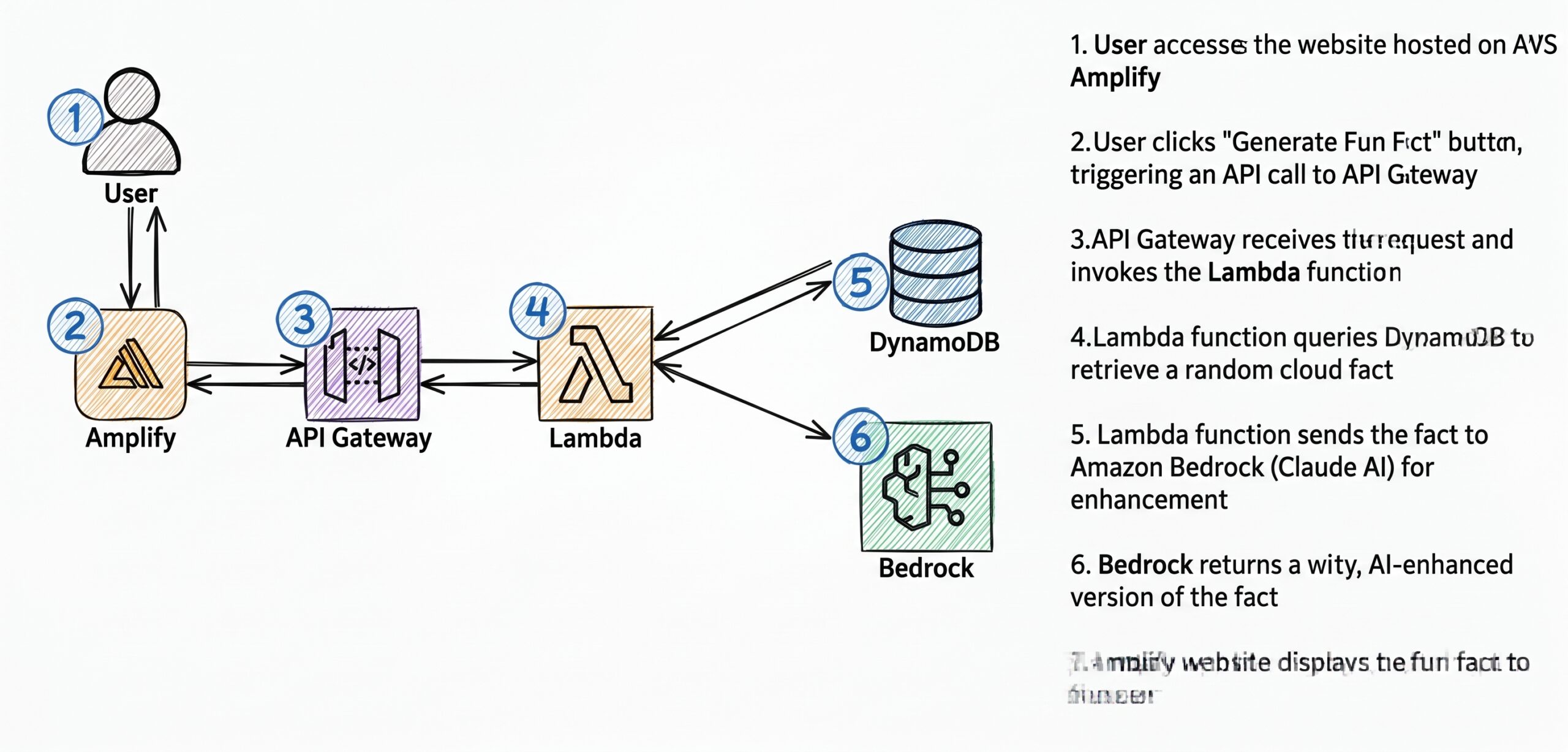
AWS Cloud Fun Facts Generator Using AWS Bedrock
Learning AWS can feel dry when tutorials only show isolated services. You often see Lambda, S3, or API Gateway separately, but rarely in a project that connects them in a meaningful way. That makes it hard to understand how cloud applications really work.
You want a project that is hands-on, interactive, and fun, while also giving you something to showcase in your portfolio. Instead of a “hello world” exercise, you want to build a small, real application that demonstrates practical cloud skills.
The Cloud Fun Facts Generator does exactly that. With a click of a button, it delivers random cloud facts, and behind the scenes, you’ll connect multiple AWS services to make it dynamic, scalable, and interactive.
You’ll start with a Lambda + API Gateway backend, optionally add DynamoDB to store facts, and can even integrate Amazon Bedrock to generate witty, AI-powered responses. By the end, you’ll have a project that’s both fun and portfolio-ready, while gaining hands-on experience across several AWS services.
Services Used 🛠
- AWS Lambda: Serverless backend to generate cloud fun facts.
- Amazon API Gateway: Exposes the Lambda as a REST API endpoint.
- Amazon DynamoDB: Database for storing facts.
- Amazon Bedrock: Generative AI to make facts witty using Minimax v.2.1 .
- AWS Amplify: Hosting service for the React frontend.
- AWS IAM: Identity and Access Management for secure permissions.
Step 1: Create a Lambda Function
- Go to AWS Management Console → Search for Lambda.
- Click Create function.
- Select Author from scratch.
- Function name:
CloudFunFacts - Runtime: Python 3.13
import boto3
import random
import json

# DynamoDB connection
dynamodb = boto3.resource("dynamodb")
table = dynamodb.Table("CloudFacts")

# Bedrock client
bedrock = boto3.client("bedrock-runtime")

def lambda_handler(event, context):
    # Fetch all facts from DynamoDB
    response = table.scan()
    items = response.get("Items", [])
    if not items:
        return {
            "statusCode": 200,
            "headers": {
                "Content-Type": "application/json",
                "Access-Control-Allow-Origin": "*",
                "Access-Control-Allow-Methods": "GET, OPTIONS",
                "Access-Control-Allow-Headers": "Content-Type"
            },
            "body": json.dumps({"fact": "No facts available in DynamoDB."})
        }

    fact = random.choice(items)["FactText"]

    # Messages payload for Bedrock Converse API
    messages = [
        {
            "role": "user",
            "content": [
                {
                    "text": f"Take this cloud computing fact and make it fun and engaging in 1-2 sentences maximum. Keep it short and witty: {fact}"
                }
            ]
        }
    ]

    try:
        # Call MiniMax M2.1 on Bedrock using the Converse API
        response = bedrock.converse(
            modelId="minimax.minimax-m2.1",
            messages=messages,
            inferenceConfig={
                "maxTokens": 100,
                "temperature": 0.7
            }
        )

        # Extract output text from Converse response
        witty_fact = response["output"]["message"]["content"][0]["text"].strip()

        # Fallback if response is empty or too long
        if not witty_fact or len(witty_fact) > 300:
            witty_fact = fact

    except Exception as e:
        print(f"Bedrock error: {e}")
        witty_fact = fact

    return {
        "statusCode": 200,
        "headers": {
            "Content-Type": "application/json",
            "Access-Control-Allow-Origin": "*",
            "Access-Control-Allow-Methods": "GET, OPTIONS",
            "Access-Control-Allow-Headers": "Content-Type"
        },
        "body": json.dumps({"fact": witty_fact})
    }
Step 2: Create API Gateway
Now we’ll make this Lambda accessible through a public API endpoint.
- Go to API Gateway → Click Create API.
- Select HTTP API (simpler and cheaper than REST API).
- API Name →
FunfactsAPIIntegration → Select your Lambda functionCloudFunFacts> Click Next. - Add a route:
- Method:
GET - Path:
/funfact
What’s happening here?
- API Gateway acts as the front door to your Lambda.
- When someone hits
/funfactwith a GET request, API Gateway forwards it to Lambda, then returns the response.
At this point, you’ve built a fully functional serverless API:
- A Python Lambda that returns random cloud facts.
- An API Gateway endpoint that makes it accessible over the internet.
This is your foundation. In the next stages, we’ll:
- Store facts in DynamoDB instead of hardcoding them.
- Make them witty using GenAI models.
- Add a frontend with Amplify so users can interact visually.
Step 3: Create DynamoDB Table
DynamoDB is AWS’s NoSQL database – super fast, serverless, and fully managed.
- Go to AWS Management Console → Search for DynamoDB.
- Click Create table.
- Table name:
CloudFacts - Partition key:
FactID(String)
- Table name:
Now, let’s add a few sample fun facts to our database:
Go to your CloudFacts table → Explore table items → Create item.
Go to your CloudFacts table → Explore table items → Create item.
{ "FactID": "1", "FactText": "AWS S3 was one of the very first AWS services, launched in 2006." }
{ "FactID": "2", "FactText": "Netflix runs almost all of its infrastructure on AWS." }
{ "FactID": "3", "FactText": "Cloud computing can save companies up to 30% on IT costs." }
{ "FactID": "4", "FactText": "NASA uses AWS to store and share Mars mission data with the public." }
{ "FactID": "5", "FactText": "AWS has more than 200 fully featured services today." }
{ "FactID": "6", "FactText": "The 'cloud' doesn’t float in the sky, it’s made of giant data centers on Earth." }
{ "FactID": "7", "FactText": "More than 90% of Fortune 100 companies use AWS." }
{ "FactID": "8", "FactText": "AWS data centers are so secure that they require retina scans and 24/7 guards." }
{ "FactID": "9", "FactText": "Serverless doesn’t mean there are no servers, it just means you don’t manage them." }
{ "FactID": "10", "FactText": "Each AWS Availability Zone has at least one independent power source and cooling system." }
{ "FactID": "11", "FactText": "Amazon once accidentally took down parts of the internet when S3 had an outage in 2017." }
{ "FactID": "12", "FactText": "The fastest-growing AWS service is Amazon SageMaker, used for Machine Learning." }
{ "FactID": "13", "FactText": "The word 'cloud' became popular in the 1990s as a metaphor for the internet." }
{ "FactID": "14", "FactText": "AWS Lambda can automatically scale from zero to thousands of requests per second." }
{ "FactID": "15", "FactText": "More data is stored in the cloud today than in all personal computers combined." }
Step 4: Update Lambda Role
By default, our Lambda cannot talk to DynamoDB. We must grant it permission:
- Go to IAM → Roles.
- Find the role associated with your
CloudFunFactsLambda. - Attach policy: AmazonDynamoDBReadOnlyAccess.
Step 5: Request Model Access in Bedrock
- Go to the Amazon Bedrock Console in your region.
- In the left menu, choose Model catalog.
- Find Minimax (e.g., Minimax 2.1)
Go to IAM Console → Roles. Open the role attached to your Lambda function (CloudFunFactsRole). Attach the policy: AmazonBedrockFullAccess (this allows your Lambda to call Bedrock models).
Go to Lambda → Select your function → Test. Run the function a few times. Instead of plain facts, you’ll see playful AI-generated versions of the same facts. Example:
- Input fact: “The fastest-growing AWS service is Amazon SageMaker, used for Machine Learning.”
- Output witty fact: “More than 90% of Fortune 100 companies use AWS.”
Clean-up Steps
To avoid ongoing AWS charges, remember to delete the resources you created:
- Amplify App
- Go to AWS Amplify Console
- Select your app → Actions → Delete App
- API Gateway
- Go to API Gateway Console
- Select your
FunfactsAPI→ Actions → Delete
- Lambda Function(s)
- Go to Lambda Console
- Delete functions you created (e.g.,
CloudFunFacts) - Clean up associated log groups in CloudWatch Logs (
/aws/lambda/...)
- DynamoDB Table
- Go to DynamoDB Console
- Select the
CloudFactstable → Actions → Delete table
- IAM Role (Optional)
- Go to IAM > Roles
- Delete the custom role created for your Lambda (e.g.,
CloudFunFacts-role-xyz)
- CloudWatch Logs
- Go to CloudWatch > Log groups
- Delete Lambda function log groups (they start with
/aws/lambda/)
You can Take a look