Grafana to WhatsApp: How I Built Alert Delivery with WAHA on Ubuntu
If your team doesn’t actively use Telegram, alerting there won’t help much in real incidents.
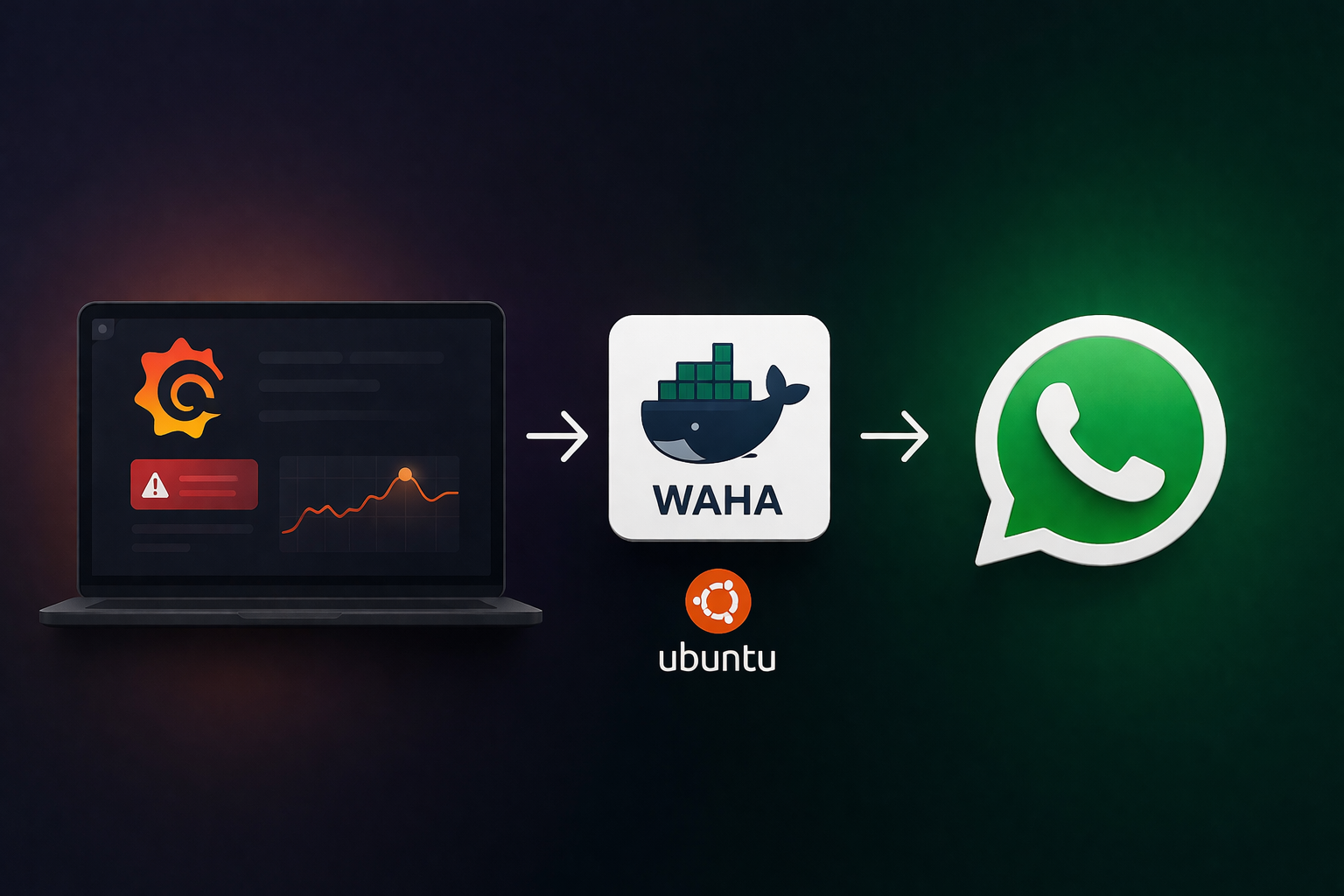
In our case, the team lives in WhatsApp groups — so we integrated Grafana alerts into WhatsApp using WAHA and a lightweight webhook relay on Ubuntu.
This guide shows exactly how we did it in production with an existing Prometheus + Grafana stack.
Why We Did This
We already had:
- Prometheus scraping our servers
- Grafana dashboards and alerts working
- Telegram notifications active (but low adoption)
What we needed: - Alert delivery to a WhatsApp group
- A clean, readable message format
– Stable startup after reboots (production-safe behavior)
Architecture (Simple and Reliable)
We used this flow:
Grafana Alert -> Webhook Contact Point -> Local Relay API -> WAHA -> WhatsApp Group
Components:
- WAHA container (WhatsApp API)
- Relay container (small Flask service)
- Grafana webhook contact point
Ports we used: - 3100 for WAHA (3000 was already used by Grafana)
– 3800 for local relay (127.0.0.1 only)
Step 1) Deploy WAHA + Relay with Docker Compose
Create a stack directory:
mkdir -p /opt/wa-alert-relay/relay
Add a docker-compose.yml with two services (waha and grafana-wa-relay), and map ports:
- 3100:3000 for WAHA
- 127.0.0.1:3800:3800 for relay
Use restart: unless-stopped for both services.
Then:
cd /opt/wa-alert-relay
docker compose up -d --buildStep 2) Pair WhatsApp Session (QR Login)
https://waha.devlike.pro/docs/overview/quick-start
Open:
http://<server>:3100/dashboard
Log in with WAHA dashboard credentials, start sessiondefault, and scan QR code with the WhatsApp account that is already in your target group.
When session status becomes WORKING, you’re ready.
Step 3) Get WhatsApp Group Chat ID
Once session is working, fetch groups:
curl -H “X-Api-Key: ” \
“http://127.0.0.1:3100/api/default/groups”
Look for the group you want and copy the ID ending with @g.us, for example:
[email protected]
Set it in relay env:
WA_GROUP_CHAT_ID=[email protected]
Restart relay:
docker compose up -d grafana-wa-relay
Step 4) Add Grafana Contact Point (Webhook)
In Grafana:
- Alerting -> Contact points -> New contact point
- Type: Webhook
- URL:
http://127.0.0.1:3800/grafana-alert?token=
Why query token?
Some Grafana versions make custom headers less obvious in UI. Query token is a practical workaround and worked perfectly for us.
Then click Test.
Step 5) Make Messages Human-Friendly
Default alert payloads can be noisy (Value, long Source links, Silence URLs, etc.).
Our relay reformats alerts to a concise style:
- FIRING/RESOLVED – AlertName
- Server: hostname
- Severity: warning/critical
- Short description
This made alerts much easier for on-call engineers to read quickly in group chat.
Step 6) Production Hardening
For real production use, we also added:
- Persistent WA session storage (/opt/wa-alert-relay/waha-data)
- Static credentials in .env (no random credentials on restart)
- Systemd startup unit for boot-time reliability
- Session auto-start script after reboot
- Health check endpoint: http://127.0.0.1:3800/health
Systemd unit:
/etc/systemd/system/wa-alert-relay.service
Enable it:
systemctl daemon-reload
systemctl enable –now wa-alert-relay.service
Stack survives reboot and comes back automatically
Important Note
WAHA is based on WhatsApp Web automation (not official WhatsApp Business Cloud API for group messaging).
Full Detailed Deployment Package: Grafana to WhatsApp Alerts with WAHA (Ubuntu + Docker)
I’m sharing the exact files and commands to deploy a production-ready alert bridge from Grafana to a WhatsApp group using WAHA.
You’ll get:
- Docker Compose stack
- Relay API (Flask)
- Systemd auto-start
- QR/session workflow
- Grafana webhook setup
– End-to-end test
1) Prerequisites
- Ubuntu server
- Docker + Docker Compose plugin
- Existing Prometheus + Grafana stack
- Grafana already running (in our case on :3000)
We’ll use: - WAHA on :3100
– Relay on 127.0.0.1:3800
2) Create Project Structure
sudo mkdir -p /opt/wa-alert-relay/relay
cd /opt/wa-alert-relay
3) docker-compose.yml
Create /opt/wa-alert-relay/docker-compose.yml:
services:
waha:
image: devlikeapro/waha:latest
container_name: waha
restart: unless-stopped
environment:
WAHA_API_KEY: ${WAHA_API_KEY}
WHATSAPP_DEFAULT_ENGINE: WEBJS
WAHA_DASHBOARD_USERNAME: ${WAHA_DASHBOARD_USERNAME}
WAHA_DASHBOARD_PASSWORD: ${WAHA_DASHBOARD_PASSWORD}
WHATSAPP_SWAGGER_USERNAME: ${WHATSAPP_SWAGGER_USERNAME}
WHATSAPP_SWAGGER_PASSWORD: ${WHATSAPP_SWAGGER_PASSWORD}
WAHA_PRINT_QR: “false”
ports:
– “3100:3000”
volumes:
– ./waha-data:/app/.sessions
grafana-wa-relay:
build:
context: ./relay
container_name: grafana-wa-relay
restart: unless-stopped
environment:
RELAY_WEBHOOK_TOKEN: ${RELAY_WEBHOOK_TOKEN}
WAHA_BASE_URL: ${WAHA_BASE_URL}
WAHA_API_KEY: ${WAHA_API_KEY}
WAHA_SESSION: ${WAHA_SESSION}
WA_GROUP_CHAT_ID: ${WA_GROUP_CHAT_ID}
RELAY_LISTEN_PORT: ${RELAY_LISTEN_PORT}
ports:
– “127.0.0.1:${RELAY_LISTEN_PORT}:${RELAY_LISTEN_PORT}”
depends_on:
– waha
4) .env
Create /opt/wa-alert-relay/.env:
WAHA_API_KEY=CHANGE_ME_STRONG_KEY
WAHA_DASHBOARD_USERNAME=admin
WAHA_DASHBOARD_PASSWORD=CHANGE_ME_STRONG_PASSWORD
WHATSAPP_SWAGGER_USERNAME=admin
WHATSAPP_SWAGGER_PASSWORD=CHANGE_ME_STRONG_PASSWORD
RELAY_WEBHOOK_TOKEN=CHANGE_ME_STRONG_WEBHOOK_TOKEN
WAHA_BASE_URL=http://waha:3000
WAHA_SESSION=default
WA_GROUP_CHAT_ID=
RELAY_LISTEN_PORT=3800
5) Relay App Files
/opt/wa-alert-relay/relay/requirements.txt
Flask==3.1.0
requests==2.32.3
gunicorn==23.0.0
/opt/wa-alert-relay/relay/Dockerfile
FROM python:3.12-slim
WORKDIR /app
ENV PYTHONDONTWRITEBYTECODE=1
ENV PYTHONUNBUFFERED=1
COPY requirements.txt /app/requirements.txt
RUN pip install –no-cache-dir -r /app/requirements.txt
COPY app.py /app/app.py
CMD [“gunicorn”, “-w”, “2”, “-b”, “0.0.0.0:3800”, “app:app”]/opt/wa-alert-relay/relay/app.py
import os
import time
from typing import Any
import requests
from flask import Flask, jsonify, request
app = Flask(name)
RELAY_WEBHOOK_TOKEN = os.getenv(“RELAY_WEBHOOK_TOKEN”, “”)
WAHA_BASE_URL = os.getenv(“WAHA_BASE_URL”, “http://waha:3000”).rstrip(“/”)
WAHA_API_KEY = os.getenv(“WAHA_API_KEY”, “”)
WAHA_SESSION = os.getenv(“WAHA_SESSION”, “default”)
WA_GROUP_CHAT_ID = os.getenv(“WA_GROUP_CHAT_ID”, “”)
RELAY_LISTEN_PORT = int(os.getenv(“RELAY_LISTEN_PORT”, “3800”))
DEDUP_TTL_SECONDS = 120
dedup: dict[str, float] = {} def _extract_alerts(payload: dict[str, Any]) -> list[dict[str, Any]]: alerts = payload.get(“alerts”) if isinstance(alerts, list) and alerts: return [a for a in alerts if isinstance(a, dict)] labels = payload.get(“labels”, {}) annotations = payload.get(“annotations”, {}) if isinstance(labels, dict) and labels: return [{“status”: payload.get(“status”, “firing”), “labels”: labels, “annotations”: annotations}] return [] def _fmt_alert(alert: dict[str, Any]) -> str: status = str(alert.get(“status”, “firing”)).upper() labels_raw = alert.get(“labels”) annotations_raw = alert.get(“annotations”) labels = labels_raw if isinstance(labels_raw, dict) else {} annotations = annotations_raw if isinstance(annotations_raw, dict) else {} alertname = labels.get(“alertname”, “UnknownAlert”) host = labels.get(“host”) or labels.get(“instance”) or “unknown” sev = labels.get(“severity”, “info”) desc = annotations.get(“description”) or annotations.get(“summary”) or “Alert triggered.” lines = [ f”{status} – {alertname}”, f”Server: {host}”, f”Severity: {sev}”, str(desc), ] mountpoint = labels.get(“mountpoint”) if mountpoint: lines.append(f”Mountpoint: {mountpoint}”) return “\n”.join(lines) def _dedup_key(alert: dict[str, Any]) -> str: labels_raw = alert.get(“labels”) labels = labels_raw if isinstance(labels_raw, dict) else {} status = str(alert.get(“status”, “firing”)).lower() return “|”.join([ status, str(labels.get(“alertname”, “”)), str(labels.get(“instance”, “”)), str(labels.get(“mountpoint”, “”)), str(alert.get(“fingerprint”, “”)), ]) def _is_duplicate(key: str) -> bool: now = time.time() expired = [k for k, ts in _dedup.items() if (now – ts) > DEDUP_TTL_SECONDS] for k in expired: _dedup.pop(k, None) if key in _dedup: return True _dedup[key] = now return False def _send_text(message: str) -> tuple[bool, str]: if not WA_GROUP_CHAT_ID: return False, “WA_GROUP_CHAT_ID empty” url = f”{WAHA_BASE_URL}/api/sendText” headers = {“Content-Type”: “application/json”} if WAHA_API_KEY: headers[“X-Api-Key”] = WAHA_API_KEY body = { “session”: WAHA_SESSION, “chatId”: WA_GROUP_CHAT_ID, “text”: message, } try: r = requests.post(url, headers=headers, json=body, timeout=20) if 200 <= r.status_code < 300: return True, “ok” return False, f”waha_http{r.status_code}: {r.text[:300]}”
except Exception as e:
return False, f”waha_error: {e}”
@app.get(“/health”)
def health() -> Any:
return jsonify({“ok”: True, “service”: “grafana-wa-relay”})
@app.post(“/grafana-alert”)
def grafana_alert() -> Any:
token = request.headers.get(“X-Relay-Token”, “”) or request.args.get(“token”, “”)
if not RELAY_WEBHOOK_TOKEN or token != RELAY_WEBHOOK_TOKEN:
return jsonify({“ok”: False, “error”: “unauthorized”}), 401
payload = request.get_json(silent=True) or {}
alerts = _extract_alerts(payload)
if not alerts:
return jsonify({“ok”: True, “sent”: 0, “skipped”: 0, “reason”: “no_alerts”})
sent = 0
skipped = 0
errors = []for alert in alerts:
key = _dedup_key(alert)
if _is_duplicate(key):
skipped += 1
continue
msg = _fmt_alert(alert)
ok, reason = _send_text(msg)
if ok:
sent += 1
else:
errors.append(reason)
code = 200 if not errors else 502
return jsonify({“ok”: len(errors) == 0, “sent”: sent, “skipped”: skipped, “errors”: errors}), code
if name == “main“:
app.run(host=”0.0.0.0″, port=RELAY_LISTEN_PORT)
6) Bring Stack Up
cd /opt/wa-alert-relay
docker compose up -d –build
docker compose ps
7) Pair WhatsApp and Start Session
Open dashboard:
http://<server>:3100/dashboard
Use credentials from .env, start default session, scan QR, wait for WORKING.
8) Get Group Chat ID
curl -H “X-Api-Key: ” \
“http://127.0.0.1:3100/api/default/groups”
Copy your target …@g.us, then set:
[email protected]
Apply:
cd /opt/wa-alert-relay
docker compose up -d grafana-wa-relay
9) Grafana Contact Point Setup
In Grafana:
- Alerting -> Contact points -> New contact point
- Type: Webhook
- URL:
http://127.0.0.1:3800/grafana-alert?token=YOUR_RELAY_WEBHOOK_TOKEN
Save and test.
10) Enable Auto-Start at Boot (Systemd)
/opt/wa-alert-relay/start-session.sh
!/usr/bin/env bash
set -euo pipefail
API_KEY=”${WAHA_API_KEY:-}”
BASE_URL=”http://127.0.0.1:3100″
if [[ -z “${API_KEY}” ]]; then
exit 0
fi
for _ in $(seq 1 30); do
if curl -s -H “X-Api-Key: ${API_KEY}” “${BASE_URL}/api/sessions/default” >/dev/null 2>&1; then
break
fi
sleep 2
done
curl -s -X POST “${BASE_URL}/api/sessions/default/start” -H “X-Api-Key: ${API_KEY}” >/dev/null 2>&1 || true
exit 0
chmod +x /opt/wa-alert-relay/start-session.sh
/etc/systemd/system/wa-alert-relay.service
[Unit]Description=WA Alert Relay Docker Compose Stack
Requires=docker.service
After=docker.service network-online.target
Wants=network-online.target
[Service]Type=oneshot
WorkingDirectory=/opt/wa-alert-relay
EnvironmentFile=/opt/wa-alert-relay/.env
ExecStart=/usr/bin/docker compose up -d
ExecStartPost=/opt/wa-alert-relay/start-session.sh
ExecStop=/usr/bin/docker compose down
RemainAfterExit=yes
TimeoutStartSec=0
[Install]WantedBy=multi-user.target
Enable:
systemctl daemon-reload
systemctl enable –now wa-alert-relay.service
systemctl status wa-alert-relay.service
11) End-to-End Test
curl -X POST “http://127.0.0.1:3800/grafana-alert?token=YOUR_RELAY_WEBHOOK_TOKEN” \
-H “Content-Type: application/json” \
-d ‘{“alerts”:[{“status”:”firing”,”labels”:{“alertname”:”ProdReadyTest”,”severity”:”warning”,”host”:”cpk1.trdns.com”},”annotations”:{“description”:”relay production test”}}]}’
Expected: message appears in your WhatsApp group.
12) Operations Cheat Sheet
stack status
cd /opt/wa-alert-relay && docker compose ps
logs
cd /opt/wa-alert-relay && docker compose logs -f –tail=100
relay health
curl -s http://127.0.0.1:3800/health
service status
systemctl status wa-alert-relay.service